A small adventure with its own rules
Aetheria: The Ember Trail gives you a different kind of browser expedition: a top-down pixel landscape, a character you can move immediately, and a sequence of three regions to complete at your own pace. You do not need an ARENA2 folder, a Daggerfall character or a multiplayer account. Use the player above to open the separate game. Its interface currently uses Simplified Chinese, while this guide explains the practical decisions in English. The start screen lets you select a class before entering the first island.
This is an independent single-player adaptation using artwork and maps from the supplied Aetheria desktop client. Combat, progression, encounters and chapter goals were rebuilt for this browser edition. It does not connect to the original Aetheria server. It is also separate from Daggerfall, Bethesda and the DFO Online project: you cannot move a Daggerfall character into this adventure, and finishing an Aetheria chapter does not change anything in your Daggerfall account. Think of it as another game to explore, with a much smaller, clearly defined journey.
Choose a class by distance, not by a tier list
The first choice is how close you want to stand to danger. The Warden, labeled 守林者, begins with more health and fights at close range. This gives you room to make early mistakes, but you still need to approach an enemy before landing a sword attack. Its skill helps when several threats gather nearby. The Ranger, 游侠, has less starting health, faster movement and a longer attack range. It suits players who prefer moving between attacks and watching a fight from a little farther away.
The Star Mage, 星术师, starts with the least health of the three and offers stronger ranged damage. Distance remains useful, but it is not complete protection: avoid enemy attack areas and leave yourself a route out. All three classes share the same three-region campaign, camp services and equipment categories. None requires a paid unlock or a separate account. Your class is part of the active save. To experiment with another one without losing a journey you want to keep, export a backup before confirming a new adventure.
Get your bearings before leaving camp
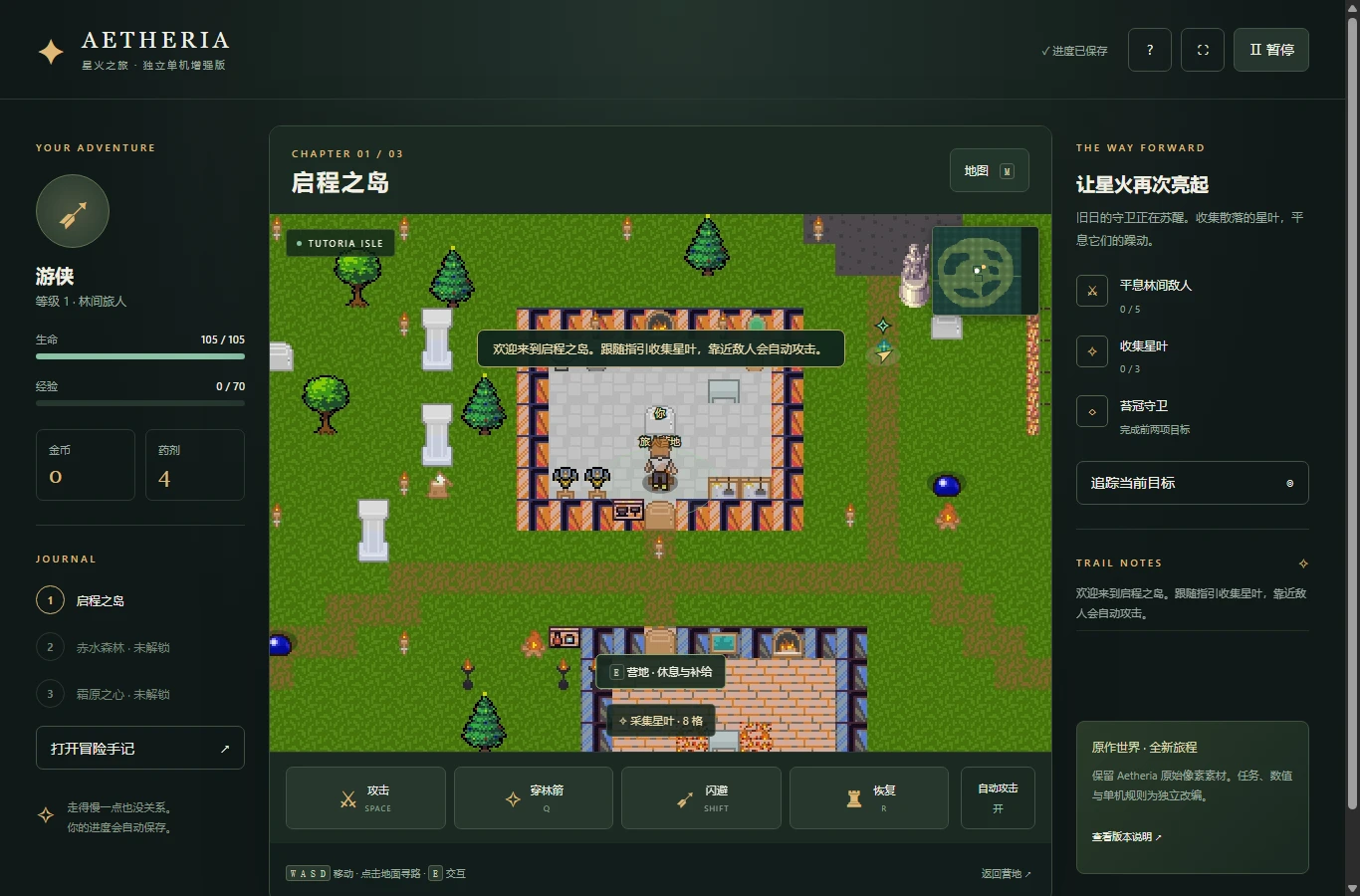
Tutoria Isle is your starting region. Begin by finding the camp and watching how the objective tracker relates to the minimap. The white marker identifies you; the game also marks the camp and current goal. A direct arrow is a direction, not a promise of a clear walking route. Buildings, water and other obstacles can stand between you and the objective. Use the tracking control to see a route, or click a reachable piece of ground to request a path on desktop. Pressing a movement key takes control back from automatic walking.
Movement uses WASD or the arrow keys. The touch version provides a virtual joystick and action buttons. Your character cannot cross every tile that appears visually open, so learn the accessible passages rather than repeatedly pushing into an obstacle. The landscape uses the original map layout, but the browser objectives were placed for this independent campaign. Exploring beyond the immediate task can be enjoyable; it is not necessary to search every corner or identify every decoration before you can move to the next chapter.
Read a fight before spending every cooldown
Automatic basic attacks are enabled initially. When a suitable enemy is nearby, your character attacks without requiring a key press for each swing. You still control position, special skills and recovery. You can switch automatic attack off and use Space for manual basic attacks. Q activates the class skill, Shift performs a short dash, and R drinks a potion. The dash briefly protects you from damage, but its cooldown means it works best as a planned response to a threatening attack rather than as a permanent way to ignore enemies.
Watch the enemy wind-up and the ground around you. Moving outside an incoming attack can save more health than standing still to deliver one extra hit. Range and line of sight apply to attacks, so a wall between you and an enemy matters even when the two characters look close on screen. The class skill has a six-second cooldown. A skill attempted with no enemy in range does not spend that cooldown. Recovery potions restore part of your maximum health, and drinking at full health does not consume one. These rules reward deliberate input without requiring perfect timing.
Turn a chapter objective into a clear route
Each region combines ordinary combat with collection, followed by a guardian encounter. On Tutoria Isle, defeat five enemies and gather three star leaves to reach the guardian objective. Leaves are luminous collectibles that are picked up when you approach them; they do not need the same interaction as a chest. Follow the quest panel to distinguish a collection goal from an enemy target. When the guardian becomes available, take a moment to check your health and potion supply rather than immediately walking into the fight.
The next chapter, Redwater Forest, requires seven enemy defeats and four leaves. Glacial Plains asks for eight defeats and five leaves before its final guardian. These numbers describe this solo adaptation, not the original online game. A completed guardian remains completed in your save. Some ordinary enemies can return after you have moved away, allowing more experience and gold to be earned. Clearing the final guardian records the ending, after which you can continue exploring. The journey has a definite completion state; it is not an endless multiplayer world or an unlimited collection of original-server quests.
Use the camp as a place to make decisions
Stand near the camp and press E to open its services. Touch players can use the interaction button. Resting restores health without a gold cost. Gold from combat and supply chests can pay for potions, weapon upgrades or armor upgrades. Weapons increase attack power; armor increases maximum health. Each equipment category has five upgrade levels, with higher prices as you progress. A stronger weapon helps shorten fights, while more health provides a larger margin for recovery. Choose based on the trouble you actually encounter instead of buying every available item automatically.
Supply chests need a nearby interaction and reward a particular save once. Reopening a chest menu does not create another reward. Travel is also handled at camp: completing a region guardian unlocks the next destination. The return-to-camp shortcut is useful between encounters, but it refuses to teleport you away when an enemy is close. Finish the fight or move to safety first. These restrictions make camp a meaningful part of your route without forcing you to restart an entire chapter whenever you want to rest or spend gold.
Understand where this adventure is saved
Aetheria keeps progress in browser storage for the hosted game. This includes your class, character level, experience, gold, equipment, potions, chapter objectives, collected rewards, position and settings. Saving happens during play and around important progress events. There is no cloud account behind the save indicator. Clearing browser data, changing devices or using a different browser profile can leave you without access to the same local journey. An embedded game may also encounter storage restrictions that do not apply when you open it directly in its own tab.
The pause menu includes export and import controls for a JSON backup. Export before clearing data, changing devices or starting a new class. Keep the file somewhere you can find again, and import it in the destination browser when you want to continue. The game checks an imported file before replacing the active save. A blocked storage write or unreadable save is reported instead of being silently treated as successful. Because browsers may partition embedded storage by the parent website, do not assume that playing here and on another site automatically shares a save, even when both pages embed the same game address.
Pause, recover and continue comfortably
The pause button stops the adventure clock and combat. The game also pauses when it loses focus, making it easier to step away without leaving a character exposed. After a defeat, use the recovery option to return to play; you do not need to create an entirely new character. Your saved progression and chapter goals are designed to survive recovery. If you want to restart deliberately, use the new-journey option and read its confirmation. A restart is different from resuming after a defeat or loading a backup.
On a phone, try the full-game link if the embedded viewport feels cramped. The interface has touch controls and rearranges its panels for narrow screens, but actual comfort depends on the device and browser. Rotate the screen if it gives you more useful space. If loading stalls, open the game in its own tab and retry there. Check whether browser privacy settings prevent storage when a save warning appears. Export a backup while the game still has your progress available, and avoid clearing all site data as your first troubleshooting step.
What to expect after the final guardian
The three-chapter structure makes Aetheria a compact change of pace for someone who enjoys fantasy exploration but wants a smaller task than a long Daggerfall session. You can revisit unlocked regions, improve equipment or try another class with a separate exported backup. The value of another run comes from different movement and combat choices. The browser edition does not claim additional hidden regions, player trading, cooperative parties or an original-server economy. Its retained pixel artwork and its newly written solo rules belong to the same playable adaptation, but they have different origins.
Use the screenshots on this page to judge the actual visual style, and use the first island to decide whether the controls feel right for you. The image captions describe this browser edition, not footage of Daggerfall or a promise of a large online world. If you return to Daggerfall afterward, use the separate browser-client link and its own guides. Keeping the two games and their saves distinct makes it easier to enjoy each one for what it actually provides.
Aetheria questions before you play
Is Aetheria a Daggerfall expansion?
No. It is an independent pixel RPG with its own world, rules and local save. It is not a Daggerfall mod or a Bethesda release.
Do I need ARENA2 files?
No. This Aetheria edition loads its own game resources. The ARENA2 requirement applies to the separate Daggerfall browser client.
Can I play with friends?
This edition is single-player. It does not connect to the original Aetheria server or the Daggerfall multiplayer service.
Which language does the game use?
The current game interface is Simplified Chinese. This English guide explains the controls, classes, chapter goals and save system.
Which class should I try first?
The Warden gives you more starting health; the Ranger offers speed and distance; the Star Mage favors stronger ranged damage. Every class can finish all three chapters.
Will my save follow me to another website?
Do not rely on it. Browser storage can be partitioned by the embedding website. Export a JSON backup and import it where you want to continue.
Can I keep playing after the ending?
Yes. The final guardian records completion, and you can continue exploring unlocked regions. A new class requires a new journey, so back up the current one first.
Why does the return-to-camp button refuse to work?
An enemy is too close. Move away or complete the encounter before using the shortcut, then interact with the camp to rest or travel.
What should I do if the frame stays blank?
Use Open full game to retry in a separate tab. If that works, the browser may be restricting embedded resources or storage. Keep a backup before changing browser data settings.