
FIELD NOTES · 01
A chamber puzzle, not another open world
Temple of the Jackal offers a small, deliberate change of pace from Daggerfall. Its Egyptian temple presentation surrounds a color-matching puzzle: rotate the chamber, let gravity move its orbs and bring matching colors together. The challenge is reading a compact arrangement rather than exploring a continent, developing a combat class or assembling an online party. It belongs in our exploration and puzzle-adventure selection because it rewards observation and planning.
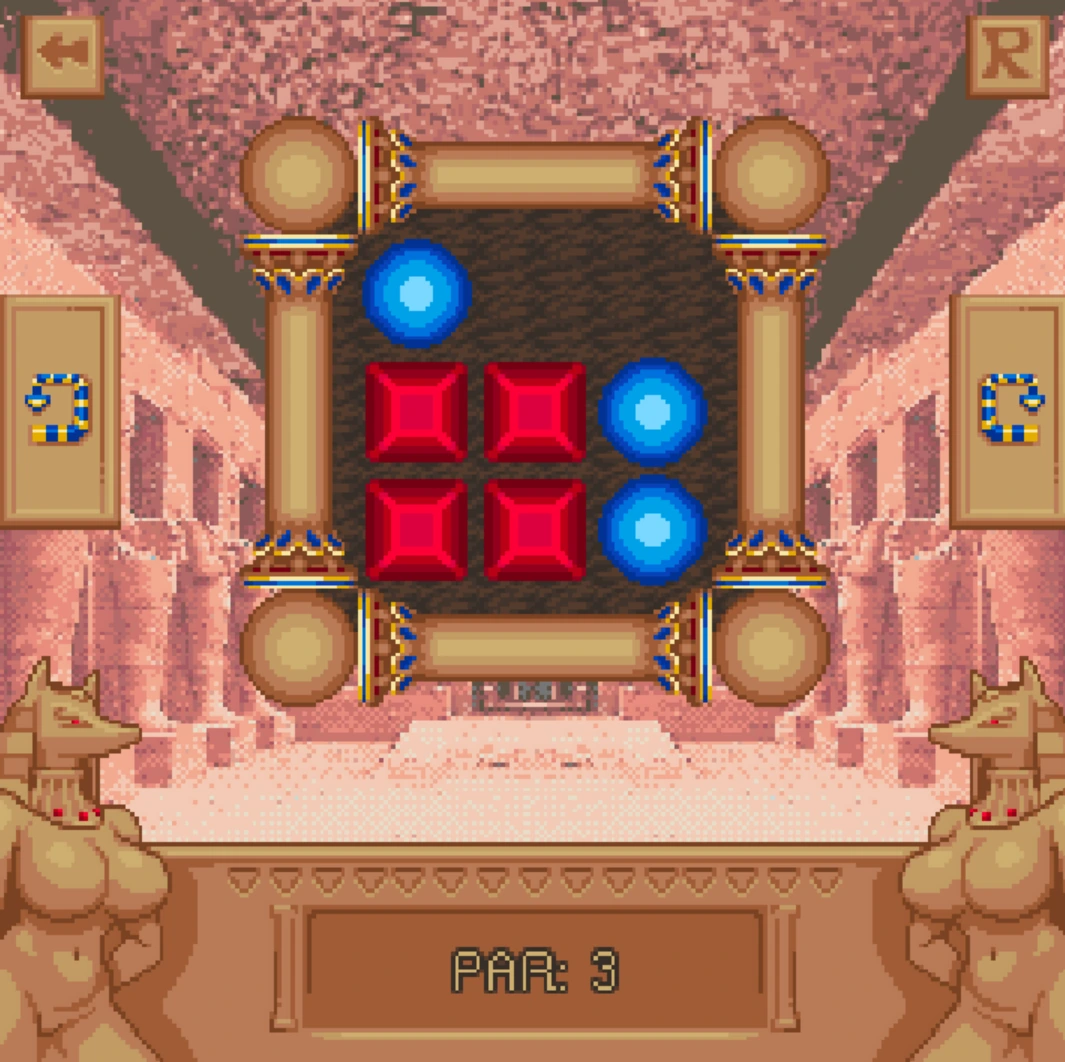
This game is strictly for adults aged eighteen or older. Its unlockable narrative material includes explicit sexual content and nudity. The puzzle screenshot on this page does not show that material, but it does not make the full game suitable for children. Read the notice above the player before deciding whether to continue. This is a separate game with its own resources and progress; it does not use ARENA2, your Daggerfall character or our multiplayer accounts. If you want a multiplayer expedition, return to Daggerfall rather than expecting a party option inside this puzzle.
FIELD NOTES · 02
Read the whole board before the first turn
Begin by locating the colored orbs, solid obstacles and available spaces. Resist the urge to rotate immediately just because two matching colors appear close together. The useful question is not only whether you can create a match now, but what the rest of the chamber will look like afterward. A move affects more than the pair you are watching.
Choose a simple way to describe the starting arrangement to yourself. Notice which orbs share a route and which are separated by the fixed structure. You do not need a perfect mental image of every pixel; you need enough information to predict the next movement. The supplied screenshot is an example chamber, not a universal solution for every room. Compare its arrangement with your current game before applying any idea from it. This distinction matters because a correct observation about one board can become a misleading assumption on another. Treat each new chamber as a fresh planning problem, even when its colors look familiar.
FIELD NOTES · 03
Rotation changes the problem for every orb
The direction controls on the sides of the board rotate the chamber through a quarter turn. Gravity then changes where the movable pieces settle. Think about the destination of every relevant orb before pressing a direction, especially when one color sits above or beside an obstacle. A rotation is a change to the entire arrangement, not a direct command to one piece.
Make a prediction, perform a single turn and wait for the movement to finish. Compare the settled board with the prediction before entering another command. If the result surprises you, identify which piece or obstruction you overlooked. Repeatedly clicking both directions can make the sequence harder to understand without improving the position. This guide does not rely on an undocumented keyboard shortcut; use the visible direction controls in the current build. When a control seems unresponsive, check whether the board is still moving and whether the pointer is inside the frame before concluding that the puzzle is broken.
FIELD NOTES · 04
A match is progress only if the remainder works
Matching colors disappear when they meet. That sounds simple, but the order of removal changes what remains available for later matches. Before choosing a rotation that produces an obvious match, look beyond the immediate disappearance. Ask where the remaining colors will settle and whether the fixed structure will keep them apart.
Try considering two stages instead of a long sequence: the match you intend to make now, and the state you want afterward. This is often enough to expose a move that looks attractive but leaves an awkward remainder. It is also easier to revise than a complete imagined solution. The goal is not to memorise an unsupported rule such as always clearing one color first. Different arrangements can demand different orders. Observe the board you actually have and use each completed match as new information. When a plan fails, describe the remaining obstruction precisely rather than treating the whole room as impossible.
FIELD NOTES · 05
Use obstacles as landmarks in your plan
The chamber structure provides a stable reference while the movable pieces change position. Identify the most important obstacle or cluster before a rotation, then watch how the orbs settle around it. Thinking in terms of routes around a landmark is easier than trying to follow every piece without reference points. It also makes it easier to explain a failed attempt to yourself.
An obstacle can separate matching colors, but its effect depends on the chamber's orientation. Do not assume a blocked relationship remains identical after every turn. Compare the direction of gravity with the shape you are using as a landmark. Ask which spaces become reachable and which pieces settle first. This is a way of organising observation, not a claim that the game follows a separate hidden pathfinding system. Keep your explanation grounded in the visible board. If you cannot predict the entire movement, focus on the one color pair that currently prevents progress, then inspect the other pieces after the turn finishes.
FIELD NOTES · 06
Reset with a question you want to answer
The visible reset control gives you a way to reconsider a chamber when the remaining arrangement no longer fits your plan. Before using it, identify the decision you want to change. Resetting without a new question can lead to repeating the same sequence and the same mistake. A useful reset creates a small experiment: preserve a pair longer, try the other initial direction or watch a previously ignored piece.
Do not confuse resetting a puzzle with clearing browser storage or restarting the whole website. Use the game's own control for a board-level retry. If you have reached a result you want to keep, inspect the available navigation and progression indicators before leaving it. This page does not claim that every browser restores every intermediate state. A simple written note of the current chamber and the move you intend to reconsider can help you resume your reasoning, but it is not a backup of game progress. Keep those two purposes separate.
FIELD NOTES · 07
Treat par as feedback rather than permission to learn
The example board displays a par value beneath the chamber. Use the game's own presentation to understand the target associated with the room. A target can encourage a more economical solution, but it should not prevent you from first learning how the pieces behave. Your first useful result may be a clear explanation of why a sequence fails rather than the shortest successful sequence.
Once you can describe a working approach, reconsider any turn that merely restores an earlier arrangement without helping the plan. Ask whether it was necessary or whether a different opening could avoid it. Do not remove a move simply because it looks repetitive; its effect on a remaining piece may still matter. This guide deliberately avoids inventing optimal solutions or claiming a universal minimum. The planning checklist below helps you inspect colors, gravity and the remainder of a match. It does not calculate par, validate a solution or communicate with the game.
FIELD NOTES · 08
Keep room progress separate from page notes
The source portal describes eighteen main puzzle rooms and narrative unlocks. Use the current game interface to see what is actually available and completed in your session. A room shown in a screenshot or a walkthrough is not proof that it has been unlocked in your browser. Similarly, checking a planning reminder on this page does not advance a room or reveal a scene.
Browser storage behaviour can differ across devices, private sessions and embedding websites. If you intend to return, use the same browser profile and avoid clearing its site data casually. A second portal may not expose the same stored state even when it loads the same hosted files. Before closing, inspect the game's own progress indications. This guide cannot promise cloud recovery, account synchronisation or transfer to another computer. The page checklist is intentionally temporary and separate from the game. It supports the reasoning you use during a visit without pretending to be a save manager or a completion tracker.
FIELD NOTES · 09
Choose a comfortable way to inspect the chamber
The surrounding player keeps a widescreen frame to match this website, while the game uses its own compact board presentation. Empty space around the board can be normal and should not be mistaken for missing puzzle tiles. Use fullscreen if the controls feel too small. A desktop or a tablet in landscape orientation generally offers more room to inspect the arrangement than a narrow phone viewport.
The webpage adapting to a phone does not establish that every game control is comfortable on that phone. Test one direction control and confirm you can read the board before continuing. Precise pointer input and clear color recognition are more important here than rapid repeated tapping. If the browser cannot enter fullscreen, continue in the page or use the source website through the link provided. Opening another site may separate stored progress, so consider that before switching during a session. No particular device performance or mobile completion has been verified by this new page alone.
FIELD NOTES · 10
Recover from loading problems without losing your plan
Allow the browser to finish loading the game resources before entering several commands. The outer document appearing is not proof that the internal game menu is ready. If the frame stays blank, check whether the browser reports a blocked resource or whether a content blocker is preventing the embedded host from loading. Keep the exact message when seeking help; different failures require different responses.
Avoid immediately deleting browser data, especially if you have completed rooms you want to retain. Try the least disruptive checks first: ensure the page has focus, wait for loading and inspect the source website if necessary. A source link offers a fallback, not a guarantee that your local state transfers there. When the board does load, return to a small, observable plan rather than rushing through inputs. Identify the colors, predict one rotation and inspect the result. That repeated cycle is the central appeal of this adventure: a compact chamber becomes understandable through attention, experimentation and careful revision, without needing an open-world map or a multiplayer group.